Monday, November 30, 2009
Reinstall windows without losing anything
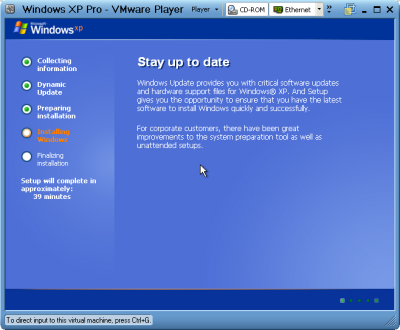
This is better than doing a windows repair install from the cd because doing that can cause changes to settings and even make it so you can't get updates anymore from Microsoft update site because of the 'silent install' they did a year or so ago (unless you rereg some dll files).
1- Start Windows XP
2- Go to the location of your source files
3- Run WINNT32 /unattend
For example, D:\I386\winnt32 /unattend ( copy & paste this command into the RUN box, then press ENTER ) Your computer will do the rest.
Start > All Programs > Accessories > Command Prompt.
Copy & paste > D:\I386\winnt32 /unattend (notice the space between 32 and / )
Press Enter.
If you have i386 on your drive, you can replace D: ( if D: is your cd drive ) with the location of it. (be sure it's the full i386 though)
D: is the driver letter where your windows XP Cd is
if D:\I386\winnt32 /unattend doesn't work then try : d:\winnt32 /unattend.
You can use this method as often as you like when you need to repair something that had gotten corrupted and you don't want to do a clean install.
This is better than doing a windows repair install from the cd because doing that can cause changes to settings and even make it so you can't get updates anymore from microsoft update site because of the 'silent install' they did a year or so ago (unless you rereg some dll files).
1- Start Windows XP
2- Go to the location of your source files
3- Run WINNT32 /unattend
For example, D:\I386\winnt32 /unattend ( copy & paste this command into the RUN box, then press ENTER ) Your computer will do the rest.
Start > All Programs > Accessories > Command Prompt.
Copy & paste > D:\I386\winnt32 /unattend (notice the space between 32 and / )
Press Enter.
If you have i386 on your drive, you can replace D: ( if D: is your cd drive ) with the location of it. (be sure it's the full i386 though)
D: is the driver letter where your windows XP Cd is
if D:\I386\winnt32 /unattend doesn't work then try : d:\winnt32 /unattend.


Make Firefox 30 Times Faster

1. Type "about:config" into the address bar and hit return. Scroll
down and look for the following entries:
network.http.pipelining
network.http.proxy.pipelining
network.http.pipelining.maxrequests
Normally the browser will make one request to a web page at a time.
When you enable pipelining it will make several at once, which really
speeds up page loading.
2. Alter the entries as follows:
Set "network.http.pipelining" to "true"
Set "network.http.proxy.pipelining" to "true"
Set "network.http.pipelining.maxrequests" to some number like 30. This
means it will make 30 requests at once.
3. Lastly right-click anywhere and select New-> Integer.
Name it "nglayout.initialpaint.delay" and set its value to "0".
This value is the amount of time the browser waits before it acts on information it
recieves.
If you're using a broadband connection you'll load pages 2-30 times faster now.
down and look for the following entries:
network.http.pipelining
network.http.proxy.pipelining
network.http.pipelining.maxrequests
Normally the browser will make one request to a web page at a time.
When you enable pipelining it will make several at once, which really
speeds up page loading.
2. Alter the entries as follows:
Set "network.http.pipelining" to "true"
Set "network.http.proxy.pipelining" to "true"
Set "network.http.pipelining.maxrequests" to some number like 30. This
means it will make 30 requests at once.
3. Lastly right-click anywhere and select New-> Integer.
Name it "nglayout.initialpaint.delay" and set its value to "0".
This value is the amount of time the browser waits before it acts on information it
recieves.
If you're using a broadband connection you'll load pages 2-30 times faster now.
Set Multiple Home Pages In Firefox
Suppose you would like to set Orkut, Google and my blog as your homepages. Then try this tweak in Firefox to set multiple homepages. This is what you should do :
Goto Tools>Options>Main
In the When Firefox starts drop down menu choose Show my home page
In Home page give your homepages separated by a | (pipe symbol)

Example:
Goto Tools>Options>Main
In the When Firefox starts drop down menu choose Show my home page
In Home page give your homepages separated by a | (pipe symbol)

Example:
Shutdown Computer/Laptop with a Cell Phone
 Using this method, a user can shutdown, restart, hibernate, etc. his or her computer, just by sending an email from his or her phone.
To do this, all you will need is Microsoft Outlook which should come with Microsoft Office, which most people have. This will need to be on the computer wish you wish to shutdown.
So, this is how you do this:
1. First, you need the batch files to perform the Shutdown, Hibernate etc. You can write them down yourselves
2. open your note pad and write like this...
c:\windows\system32\shutdown -s -f -t 00
and save it as shutdown.bat
3. Open up Microsoft Outlook. Make sure that you have already configured it for your email.Now we will need to make it so that Outlook checks your inbox about every minute (1 minute for testing time can be increased if a delayed shutdown is desired). You can do this by going to Tools: Options.
4. Then click the Mail Setup tab, and afterwards, the Send/Receive button.
5. Make sure that the Schedule an automatic send/receive every... box is checked, and set the number of minutes to 1. Now you may close all of these dialog boxes.
6. Now go to Tools: Rules and Alerts... Next click the options button in the upper right hand corner and press the Import Rules button.
7. Now select the shutdown.bat file ...which u hv created ...
8. Now, when you send a message from your phone to your e-mail address with the subject shutdown or sms shutdown%%, your computer will shutdown.
Please post your comments.
Thursday, November 12, 2009
Calculate AGE By CHOCOLATE
YOUR AGE BY CHOCOLATE MATH
Don't tell me your age; you'd probably lie anyway-but the Hershey Man will know!
YOUR AGE BY CHOCOLATE MATH
This is not one of those waste of time things, it's fun.
1. First of all, pick the number of times a week that you would like to have chocolate (more than once but less than 10)
2. Multiply this number by 2 (just to be bold)
3. Add 5
4. Multiply it by 50 -- I'll wait while you get the calculator
5. If you have already had your birthday this year add 1759 .
If you haven't, add 1758..
6.. Now subtract the four digit year that you were born.
You should have a three digit number
The first digit of this was your original number
(i.e., how many times you want to have chocolate each week).
Don't tell me your age; you'd probably lie anyway-but the Hershey Man will know!
YOUR AGE BY CHOCOLATE MATH
This is not one of those waste of time things, it's fun.
2. Multiply this number by 2 (just to be bold)
3. Add 5
4. Multiply it by 50 -- I'll wait while you get the calculator
5. If you have already had your birthday this year add 1759 .
If you haven't, add 1758..
6.. Now subtract the four digit year that you were born.
You should have a three digit number
The first digit of this was your original number
(i.e., how many times you want to have chocolate each week).
C Program Without a Main Function
How to write a C program without a main function?.Is it possible to do that.Yes there can be a C program without a main function.Here’s the code of the program without a main function…
#include
#define decode(s,t,u,m,p,e,d) m##s##u##t
#define begin decode(a,n,i,m,a,t,e)
#define begin decode(a,n,i,m,a,t,e)
int begin()
{
printf(” hello “);
}
{
printf(” hello “);
}
Does the above program run without the main function? Yes, the above program runs perfectly fine even without a main function.But how,whats the logic behind it? How can we have a C program working without main ?
Here we are using preprocessor directive #define with arguments to give an impression that the program runs without main.But in reality it runs with a hidden main function.
The ‘##‘ operator is called the token pasting or token merging operator.That is we can merge two or more characters with it.
NOTE: A Preprocessor is program which processess the source code before compilation.Look at the 2nd line of program-
#define decode(s,t,u,m,p,e,d) m##s##u##t
What is the preprocessor doing here.The macro decode(s,t,u,m,p,e,d) is being expanded as “msut” (The ## operator merges m,s,u & t into msut).The logic is when you pass (s,t,u,m,p,e,d) as argument it merges the 4th,1st,3rd & the 2nd characters(tokens).
Now look at the third line of the program-
#define begin decode(a,n,i,m,a,t,e)
Here the preprocessor replaces the macro “begin” with the expansion decode(a,n,i,m,a,t,e).According to the macro definition in the previous line the argument must de expanded so that the 4th,1st,3rd & the 2nd characters must be merged.In the argument (a,n,i,m,a,t,e) 4th,1st,3rd & the 2nd characters are ‘m’,'a’,'i’ & ‘n’.
So the third line “int begin” is replaced by “int main” by the preprocessor before the program is passed on for the compiler.That’s it…
The bottom line is there can never exist a C program without a main function.Here we are just playing a gimmick that makes us beleive the program runs without main function, but actually there exista a hidden main function in the program.Here we are using the proprocessor directive to intelligently replace the word begin” by “main” .In simple words int begin=int main.
File Embedder Project in C
Some times it is necessary for our compiled project to have it’s supporting files embedded within the EXE module itself so that the supporting files may not be put into a seperate folder and carried along with the project.So here i am presenting you with the source code of the FILE EMBEDDER UTILITY project.
This utility can be used to embed one file with in the other.ie:Suppose we need to embed a .bat file(or any other file *.exe,*bmp,.txt…..) into our final project so that the batch file is present with in the compiled module and is hidden from the users avoiding tthe need to carry the .bat file every time with the project.
Both the Embedding and extraction process has been presented in seperate functions for your convenience.here’s the code…..
#include
#include
#include
#include
#include
#include
#include
#include
#include
#include
#include
#include
#include
void embed(void);
void extract(void);
void extract(void);
char buff[1],sname[128],tname[128],dname[128],choice;
unsigned long int size=0;long int psize=0;int outh,bytes=0;
FILE *source,*target,*data;
unsigned long int size=0;long int psize=0;int outh,bytes=0;
FILE *source,*target,*data;
void main()
{
while(1)
{
clrscr();
puts(”\n\n\t\t\tFILE EMBEDDING UTILITY BY SRIKANTH\n\n\n”);
puts(”1.Embed A File 2. Extract A File 3.Exit\n”);
choice=getch();
switch(choice)
{
case ‘1′:embed();
getch();
break;
case ‘2′:
extract();
getch();
break;
default:
exit(0);
}
}
}
{
while(1)
{
clrscr();
puts(”\n\n\t\t\tFILE EMBEDDING UTILITY BY SRIKANTH\n\n\n”);
puts(”1.Embed A File 2. Extract A File 3.Exit\n”);
choice=getch();
switch(choice)
{
case ‘1′:embed();
getch();
break;
case ‘2′:
extract();
getch();
break;
default:
exit(0);
}
}
}
void embed()
{
puts(”\nEnter The Source Filename\n”);
scanf(”%s”,sname);
source=fopen(sname,”rb+”);
if(source==NULL)
{
puts(”\nCannot Open The Source File\n”);
return;
}
puts(”\nEnter The Target Filename\n”);
scanf(”%s”,tname);
outh=open(tname,O_RDONLYO_BINARY);
if(outh==-1)
{
puts(”\nCannot Open The Target File\n”);
return;
}
printf(”\nReading The Source File Please Wait…\n”);
while((bytes=read(outh,buff,1))>0)
size+=bytes;
data=fopen(”Data.cfg”,”w”);
if(data==NULL)
{
puts(”\nCannot Create Configuration The File\n”);
return;
}
fprintf(data,”%lu”,size);
close(outh);
fclose(data);
target=fopen(tname,”rb”);
if(target==NULL)
{
puts(”Cannot Open Target File\n”);
return;
}
printf(”\nEmbedding Please Wait…\n”);
fseek(source,0,SEEK_END);
while(fread(buff,1,1,target)>0)
fwrite(buff,1,1,source);
fcloseall();
printf(”\nEmbedding Completed Successfully\n”);
}
{
puts(”\nEnter The Source Filename\n”);
scanf(”%s”,sname);
source=fopen(sname,”rb+”);
if(source==NULL)
{
puts(”\nCannot Open The Source File\n”);
return;
}
puts(”\nEnter The Target Filename\n”);
scanf(”%s”,tname);
outh=open(tname,O_RDONLYO_BINARY);
if(outh==-1)
{
puts(”\nCannot Open The Target File\n”);
return;
}
printf(”\nReading The Source File Please Wait…\n”);
while((bytes=read(outh,buff,1))>0)
size+=bytes;
data=fopen(”Data.cfg”,”w”);
if(data==NULL)
{
puts(”\nCannot Create Configuration The File\n”);
return;
}
fprintf(data,”%lu”,size);
close(outh);
fclose(data);
target=fopen(tname,”rb”);
if(target==NULL)
{
puts(”Cannot Open Target File\n”);
return;
}
printf(”\nEmbedding Please Wait…\n”);
fseek(source,0,SEEK_END);
while(fread(buff,1,1,target)>0)
fwrite(buff,1,1,source);
fcloseall();
printf(”\nEmbedding Completed Successfully\n”);
}
void extract()
{
printf(”\nEnter The Source Filename\n”);
scanf(”%s”,sname);
source=fopen(sname,”rb”);
if(source==NULL)
{
printf(”\nCannot Open The Source File\n”);
return;
}
printf(”\nEnter The Target Filename(eg: abc.exe)\n”);
scanf(”%s”,tname);
printf(”\nEnter The Configuration Filename(eg: DATA.cfg)\n”);
scanf(”%s”,dname);
data=fopen(dname,”r”);
if(data==NULL)
{
printf(”\nConfiguration File Not Found\n”);
return;
}
fscanf(data,”%ld”,&psize);
target=fopen(tname,”wb”);
if(target==NULL)
{
puts(”\nCannot Open The Target File\n”);
return;
}
printf(”\nExtracting Please Wait…\n”);
fseek(source,-psize,SEEK_END);
while((fread(buff,1,1,source))>0)
fwrite(buff,1,1,target);
printf(”\nFile Extraction Completed Successfully\n”);
fcloseall();
}
{
printf(”\nEnter The Source Filename\n”);
scanf(”%s”,sname);
source=fopen(sname,”rb”);
if(source==NULL)
{
printf(”\nCannot Open The Source File\n”);
return;
}
printf(”\nEnter The Target Filename(eg: abc.exe)\n”);
scanf(”%s”,tname);
printf(”\nEnter The Configuration Filename(eg: DATA.cfg)\n”);
scanf(”%s”,dname);
data=fopen(dname,”r”);
if(data==NULL)
{
printf(”\nConfiguration File Not Found\n”);
return;
}
fscanf(data,”%ld”,&psize);
target=fopen(tname,”wb”);
if(target==NULL)
{
puts(”\nCannot Open The Target File\n”);
return;
}
printf(”\nExtracting Please Wait…\n”);
fseek(source,-psize,SEEK_END);
while((fread(buff,1,1,source))>0)
fwrite(buff,1,1,target);
printf(”\nFile Extraction Completed Successfully\n”);
fcloseall();
}
C Program to Get the Current System Date
This program will get or read the current system date from the system.It displays Year,Month and Day.
#include
#include
#include
int main(void)
{
struct date d;
getdate(&d);
printf(”The current year is: %d\n”, d.da_year);
printf(”The current day is: %d\n”, d.da_day);
printf(”The current month is: %d\n”, d.da_mon);
return 0;
}
{
struct date d;
getdate(&d);
printf(”The current year is: %d\n”, d.da_year);
printf(”The current day is: %d\n”, d.da_day);
printf(”The current month is: %d\n”, d.da_mon);
return 0;
}
C Program to Set/Change the Current System Date
This program can be used to set the system date or to change the current system date.
#include
#include
#include
#include
#include
int main(void)
{
struct date reset;
struct date save_date;
getdate(&save_date);
printf(”Original date:\n”);
system(”date”);
reset.da_year = 2001;
reset.da_day = 1;
reset.da_mon = 1;
setdate(&reset);
printf(”Date after setting:\n”);
system(”date”);
setdate(&save_date);
printf(”Back to original date:\n”);
system(”date”);
return 0;
}
{
struct date reset;
struct date save_date;
getdate(&save_date);
printf(”Original date:\n”);
system(”date”);
reset.da_year = 2001;
reset.da_day = 1;
reset.da_mon = 1;
setdate(&reset);
printf(”Date after setting:\n”);
system(”date”);
setdate(&save_date);
printf(”Back to original date:\n”);
system(”date”);
return 0;
}
C Program for Pigeon Breeding Problem
The problem is as follows…
Initially i have a pair of adult pigeons(capable of breeding) which give rise to another young pair every month until it reaches the age of 5 years(60 months).But the young pair starts breeding only when it is 2 months old.Once the adult pigeon pair starts breeding it never stops untils the age of 5 years.Assume the age of initial adult pigeon is 2 months old.This program takes the no. of months as input and will calculate the total no. of pigeons over a given time(as given by the input).This problem is framed, based on my own imagination and i call this problem as PIGEON BREEDING PROBLEM.Heres the code.
#include
#include
#include
struct node
{
int age;
struct node *link;
};
{
int age;
struct node *link;
};
typedef struct node* NODE;
NODE getnode()
{
NODE x;
x=(NODE)malloc(sizeof(struct node));
if(x==NULL)
{
printf(”Out of memory\n”);
exit(1);
}
return x;
}
{
NODE x;
x=(NODE)malloc(sizeof(struct node));
if(x==NULL)
{
printf(”Out of memory\n”);
exit(1);
}
return x;
}
void main()
{
unsigned long int count=1;
unsigned int months,i;
NODE first=getnode();/*this is the intial adult pair*/
first->age=2; /*assume the age of initial adult pair as 2*/
first->link=NULL;
printf(”Enter the no. of months\n”);
scanf(”%u”,&months);
for(i=0;iage>=2)&&(temp->age<=60)) { NODE temp1=getnode(); temp->age+=1;
temp1->age=1;
temp1->link=first;
first=temp1;
temp=temp->link;
++count;
}
else
{
temp->age+=1;
temp=temp->link;
}
}
}
printf(”Total no. of pairs after %u months=%ld\n”,months,count);
}
{
unsigned long int count=1;
unsigned int months,i;
NODE first=getnode();/*this is the intial adult pair*/
first->age=2; /*assume the age of initial adult pair as 2*/
first->link=NULL;
printf(”Enter the no. of months\n”);
scanf(”%u”,&months);
for(i=0;iage>=2)&&(temp->age<=60)) { NODE temp1=getnode(); temp->age+=1;
temp1->age=1;
temp1->link=first;
first=temp1;
temp=temp->link;
++count;
}
else
{
temp->age+=1;
temp=temp->link;
}
}
}
printf(”Total no. of pairs after %u months=%ld\n”,months,count);
}
A Self Destructing Program in C
This program will destroy itself upon execution.The program will cause the .exe file to be deleted upon execution.That is this program is capable of destroying itself upon execution.Heres the code.
#include
#include
#include
void main()
{
printf(”This program will destroy itself if u press any key!!!\n”);
getch();
remove(_argv[0]);/*array of pointers to command line arguments*/
}
#include
#include
void main()
{
printf(”This program will destroy itself if u press any key!!!\n”);
getch();
remove(_argv[0]);/*array of pointers to command line arguments*/
}
Guessing Game In C
This is a small guessing game written in C.In this guessing game you have to guess a number between 0 & 100.You have 8 chances to do that.Every time you guess wrongly the program will give you a hint that your guess is too high or your guess is too low.Based on this hint you have to guess the number in the remaining attempts.Here’s the code.
#include
#include
#include
#include
#include
void main()
{
int num,guess=-1,tries=0,pass=0;
time_t t;
srand((unsigned)time(&t));
num=rand()%100;
while((guess!=num)&&tries<8)
{
printf(”Enter the guess num b/w 0 & 100 (you have %d tries left out)\n”,(8-tries)); scanf(”%d”,&guess);
tries++;
if(guess==num)
{
printf(”Hurray you guessed it correctly!!!\n”);
pass=1;
}
else if(num< guess)
printf(”Your guess is too high\n”);
else
printf(”Your guess is too low\n”);
}
if(pass==0)
printf(”Sorry you lost! The correct number is %d\n”,num);
}
{
int num,guess=-1,tries=0,pass=0;
time_t t;
srand((unsigned)time(&t));
num=rand()%100;
while((guess!=num)&&tries<8)
{
printf(”Enter the guess num b/w 0 & 100 (you have %d tries left out)\n”,(8-tries)); scanf(”%d”,&guess);
tries++;
if(guess==num)
{
printf(”Hurray you guessed it correctly!!!\n”);
pass=1;
}
else if(num< guess)
printf(”Your guess is too high\n”);
else
printf(”Your guess is too low\n”);
}
if(pass==0)
printf(”Sorry you lost! The correct number is %d\n”,num);
}
C Program to Print the Entered Number in Words
The following C program print’s the entered number in words.For example if the number entered is 12345 then the program prints the entered number in words as One Two Three Four Five.
#include
void main()
{
int i=0;
unsigned long int digit;
char str[12],ch;
puts(”Enter the number (less than 10 digit)”);
scanf(”%lu”,&digit);
ultoa(digit,str,10); /*converts an unsigned long int to string*/
while(str[i]!=’\0′)
{
ch=str[i];
i++;
switch(ch)
{
case ‘1′:
printf(”ONE “);
break;
case ‘2′:
printf(”TWO “);
break;
case ‘3′:
printf(”THREE “);
break;
case ‘4′:
printf(”FOUR “);
break;
case ‘5′:
printf(”FIVE “);
break;
case ‘6′:
printf(”SIX “);
break;
case ‘7′:
printf(”SEVEN “);
break;
case ‘8′:
printf(”EIGHT “);
break;
case ‘9′:
printf(”NINE “);
break;
case ‘0′:
printf(”ZERO “);
break;
}
}
}
void main()
{
int i=0;
unsigned long int digit;
char str[12],ch;
puts(”Enter the number (less than 10 digit)”);
scanf(”%lu”,&digit);
ultoa(digit,str,10); /*converts an unsigned long int to string*/
while(str[i]!=’\0′)
{
ch=str[i];
i++;
switch(ch)
{
case ‘1′:
printf(”ONE “);
break;
case ‘2′:
printf(”TWO “);
break;
case ‘3′:
printf(”THREE “);
break;
case ‘4′:
printf(”FOUR “);
break;
case ‘5′:
printf(”FIVE “);
break;
case ‘6′:
printf(”SIX “);
break;
case ‘7′:
printf(”SEVEN “);
break;
case ‘8′:
printf(”EIGHT “);
break;
case ‘9′:
printf(”NINE “);
break;
case ‘0′:
printf(”ZERO “);
break;
}
}
}
C Program to Generate Numbers in Pyramid Pattern
This program generates the numbers in pyramid pattern.It takes the input from two through nine and generates the numbers in the pyramid pattern.For example if the input is 4 then the program produces the following output
…
….1
1111112 2
111113 3 3
111.4 4 4 4& so on..
1111112 2
111113 3 3
111.4 4 4 4& so on..
#include
#include
void main()
{
int i,n,j,x=40,y=10;
clrscr();
printf(”Enter n (between 2 & 9)\n”);
scanf(”%d”,&n);
for(i=1;i<=n;i++)
{
gotoxy(x,y); /* To take the cursor to the co-ordinates x & y */
for(j=1;j<=i;j++)
{
printf(”%d “,i);
}
x=x-1;
y++;
}
getch();
}
#include
void main()
{
int i,n,j,x=40,y=10;
clrscr();
printf(”Enter n (between 2 & 9)\n”);
scanf(”%d”,&n);
for(i=1;i<=n;i++)
{
gotoxy(x,y); /* To take the cursor to the co-ordinates x & y */
for(j=1;j<=i;j++)
{
printf(”%d “,i);
}
x=x-1;
y++;
}
getch();
}
C Program To Accept Password
This is a simple login program in C.While accepting password it masks each character using ‘*’ symbaol and display the password in the next line after the user hits Enter key.It also accepts backspaces and acts accordingly.
#include
#include
#include
char pw[25],ch;
int i;
void main()
{
clrscr();
puts(”Enter password”);
while(1)
{
if(i<0)
i=0;
ch=getch();
if(ch==13)
break; /*13 is ASCII value of ENTER*/
if(ch==8) /*ASCII value of BACKSPACE*/
{
putch(’\b’);
putch(NULL);
putch(’\b’);
–i;
continue;
}
pw[i++]=ch;
ch=’*';
putch(ch);
}
pw[i]=’\0′;
printf(”\n\n%s”,pw);
getch();
}
int i;
void main()
{
clrscr();
puts(”Enter password”);
while(1)
{
if(i<0)
i=0;
ch=getch();
if(ch==13)
break; /*13 is ASCII value of ENTER*/
if(ch==8) /*ASCII value of BACKSPACE*/
{
putch(’\b’);
putch(NULL);
putch(’\b’);
–i;
continue;
}
pw[i++]=ch;
ch=’*';
putch(ch);
}
pw[i]=’\0′;
printf(”\n\n%s”,pw);
getch();
}
C Program to Get the Current System Time
This program reads the current system time and displays it in the form HH:MM:SS
#include
#include
#include
int main(void)
{
struct time t;
gettime(&t);
printf(”The current time is: %2d:%02d:%02d\n”, t.ti_hour, t.ti_min, t.ti_sec); return 0;
}
{
struct time t;
gettime(&t);
printf(”The current time is: %2d:%02d:%02d\n”, t.ti_hour, t.ti_min, t.ti_sec); return 0;
}
C Program to Set/Change the Current System Time
This program can be used to set or change the system time.
#include
#include
#include
int main(void)
{
struct time t;
gettime(&t);
printf(”The current hour is: %d\n”, t.ti_hour);
printf(”The current min is: %d\n”, t.ti_min);
printf(”The current second is: %d\n”, t.ti_sec);
{
struct time t;
gettime(&t);
printf(”The current hour is: %d\n”, t.ti_hour);
printf(”The current min is: %d\n”, t.ti_min);
printf(”The current second is: %d\n”, t.ti_sec);
/* Add one to the hour,minute & sec struct element and then call settime */
t.ti_hour++;
t.ti_min++;
t.ti_sec++;
settime(&t);
printf(”The current hour is: %d\n”, t.ti_hour);
printf(”The current min is: %d\n”, t.ti_min);
printf(”The current second is: %d\n”, t.ti_sec);
return 0;
}
t.ti_min++;
t.ti_sec++;
settime(&t);
printf(”The current hour is: %d\n”, t.ti_hour);
printf(”The current min is: %d\n”, t.ti_min);
printf(”The current second is: %d\n”, t.ti_sec);
return 0;
}
Program to Print it’s Own Source Code
Here is a C program to print it’s own source code.That is the output of this program is exactly same as it’s source code.Here’s the program.
#include
char *program=”#include%cchar *
char *program=”#include
program=%c%s%c;%cvoid main()%c{%cprintf
(program,10,34,program,34,10, 10,10,10);%c}”;
void main()
{
printf(program,10,34,program,34,10,10,10,10);
}
void main()
{
printf(program,10,34,program,34,10,10,10,10);
}
C Program to Remove Comments and Blank lines from a valid C Program
This program accepts any valid C Program as an input and removes the comments and blanks from it.The output is a program that has no comments and blank lines.
#include
#include
#include
#include
void main()
{
FILE *a,*b;
FILE *a,*b;
char fname[20],ch,tch=NULL,tch1=NULL;
int flag1=0,flag=0,count=0,count1=0,count2=0;
clrscr();
clrscr();
printf(”Enter the file name (.C or .TXT)\n”);
gets(fname);
a=fopen(fname,”r”);
if(a==NULL)
{
puts(”Cannot open the source file!!!”);
delay(500);
exit(1);
}
b=fopen(”target.c”,”w”);
if(b==NULL)
{
puts(”Cannot create target file!!!”);
delay(500);
exit(1);
}
while(1)
while(1)
{
ch=fgetc(a);
if(ch==EOF) break;
else
else
{
if(ch==’\n’)
if(ch==’\n’)
{
count1=1;
tch1=ch;
continue;
}
else if(ch==’\n’&& count1==1)
else if(ch==’\n’&& count1==1)
continue;
else if(ch==’/'&&count==0)
{
flag1=1;
tch=ch;
count=1;
continue;
}
else if(ch==’*'&& flag1==1)
else if(ch==’*'&& flag1==1)
{
flag=1;
flag1=0;
tch=NULL;
}
else if(ch==’*'&&flag==1)
else if(ch==’*'&&flag==1)
{
count2=1;
count=1;
continue;
}
else if(ch==’/'&&count2==1)
else if(ch==’/'&&count2==1)
{
flag=0;
count=0;
tch=NULL;
continue;
}
else if(count==1&&flag==1)
else if(count==1&&flag==1)
count=0;
else if(flag1==1)
else if(flag1==1)
flag1=0;
}
if(flag!=1)
if(flag!=1)
{
if(tch>0)
fputc(tch,b);
if(tch1>0)
fputc(tch1,b);
tch1=NULL;
tch=NULL;
count=0,count1=0,count2=0;
fputc(ch,b);
flag1=0,flag=0;
}
}
puts(”DONE!! OP FILE IS \”TARGET.C\”\n”);
}
puts(”DONE!! OP FILE IS \”TARGET.C\”\n”);
fcloseall();
getch();
}
C Program to Print a Character without using any Output Statements
This program can be used to print character without using any output statements. This program only works in 16-bit mode since it directly writes to VDU Memory.
#include
#include
void main()
{
char far *p=(char far *)0xb8000000;
*p=’A';
getch();
}
#include
void main()
{
char far *p=(char far *)0xb8000000;
*p=’A';
getch();
}
C Program To Print A String Without Using Any Output Statements
This program can be used to print a string without using any output statements such as printf,puts etc.However this program only works in 16-bit mode since it directly writes to VDU Memory.
#include
#include
char str[]=”Hello Srikanth”;
char far *v=(char far *)0xb8000000;
void main()
{
int i;
for(i=0;i<14;i++)
{
*v=str[i];
v+=2;
}
getch();
}
#include
char str[]=”Hello Srikanth”;
char far *v=(char far *)0xb8000000;
void main()
{
int i;
for(i=0;i<14;i++)
{
*v=str[i];
v+=2;
}
getch();
}
C Program to display the No. of Digits in an Entered Number
This program displayes the number of digits present in the number that is entered through the input.
#include
#include
#include
void main()
{
unsigned long int num;
int i=0;
clrscr();
printf(”Enter the digit\n”);
scanf(”%lu”,&num);
while(num!=0)
{
num=num/10;
++i;
}
printf(”Length=%d”,i);
getch();
}
{
unsigned long int num;
int i=0;
clrscr();
printf(”Enter the digit\n”);
scanf(”%lu”,&num);
while(num!=0)
{
num=num/10;
++i;
}
printf(”Length=%d”,i);
getch();
}
How To Remove Recycle Bin From Desktop
Here is a way to remove the recycle bin from your desktop.This trick help’s people who want to get rid of the recycle bin on the desktop.

1.Goto start,Run,Type “gpedit.msc” (Type without quotes)
2.On the left panel,under User Configuration expand the tree Administrative templates
3.Click on the subtree desktop (single click,do not expand it)
4.On the right panel,Select the option-Remove Recycle Bin icon from desktop properties
5.Double click the option,on the settings tab just select the option enabled,press OK & exit the window.
6.Refesh the desktop (press F5) ,Your Recycle Bin vanishous
How to use Keyloggers – Detailed Tutorial and FAQs
I know most of you are new to the concept of keyloggers. For some of you, this might be the first time you heard about the term “keylogger”. So to give you a clear picture and make you understand better I would like to take up this post in the form of FAQs (Frequently Asked Questions). Here we go…
1. What is a Keylogger?
A keylogger (also called as spy software) is a small program that monitors each and every keystroke a user types on a specific computer’s keyboard. A keylogger program can be installed just in a few seconds and once installed you are only a step away from getting the victim’s password.2. How Keylogger works?
Once the keylogger is installed on a PC, it starts operating in the background (stealth mode) and captures every keystroke of the victim on that PC. Let’s take up a small example: The victim goes to http://mail.yahoo.com and types his “username” and the “password” in the respective fields to login. The keylogger silently records these keystrokes and stores them in the logs. These logs when opened up shows the captured “username” and “password” and will also tell you that they were typed in the Yahoo login page. Thus the keylogger loads upon every startup, runs in the background and captures each and every keystroke.
3. How to install the keylogger?
A keylogger can be installed just like any other program. Just follow the screen instructions and you’re done.
4. Do I need any special knowledge to install and use the keylogger?
Absolutely NOT! Anyone with a basic computer knowledge can install and use the keylogger. It requires no special skills.
5. Once I install the keylogger can the victim come to know about it’s presence?
No. The victim will never come to know about the presence of the keylogger on his/her computer. This is because, once installed the keylogger will run in total stealth mode. Unlike other programs it will never show up in start-menu, start-up, program files, add/remove programs and task manager. So the victim can no way identify it’s presence on his/her PC.
6. Can I be traced back if I install the keylogger on some other computer?
No, it’s almost impossible to trace back to you for installing the keylogger on other’s PC.
7. Which keylogger is the best?
Today there exists hundreds of keyloggers on the market and most of them are no more than a scam. So I tested some of the top keyloggers and conclude that the following is the best one.
SniperSpy
8. How SniperSpy works?
I will try to explain the working of Sniperspy in simple steps.
1. After you purchase Sniperspy, you’ll be able to create the installation module using easy set-up program. You need to email this module to the remote user as an attachment.
2. When the remote user runs the module it’ll get installed silently and monitoring process will begin. The keystrokes are captured and uploaded to the SniperSpy servers continously.
3. You can login to your Sniperspy account (you get this after purchase) to see the logs which contains the password.
9. I don’t have physical access to the traget computer. Can I still use SniperSpy?
Yes you can. SniperSpy supports REMOTE INSTALLATION feature which allows you to remotely install the program on any PC even if you have no physical access to it. For remote installation all you need to do is just place the module (refer FAQ-8) in a .zip/.rar file and send it as an attachment to the target email address (for which you need the password).
10. Can I install SniperSpy on a local computer?
If you need to install to your local (current) computer instead of your remote computer, then the process is simple. Simply navigate to the folder in which you saved your module ( Refer FAQ-8). Double-click the module filename to execute it. Nothing will appear on the screen as the software is installed.
11. What if the antivirus block from sending it as an email attachment?
Instead of sending the keylogger as an email attachment, it is recommended that you place the file in .ZIP/.RAR format and upload it to www.hotlinkfiles.com. After uploading, just send the direct download link to the victim via email. Once he downloads the file from this link and run it, the keylogger will get installed automatically.
12. Why SniperSpy is the best?
- SniperSpy supports REMOTE INSTALLATION feature. This feature is not present on most of the keyloggers.
- SniperSpy is fully compatible with Windows 98/ME/2000/XP/Vista and bypasses ANY Firewall.
- SniperSpy is more reliable than any other keylogger program. You need not rely on your email account to receive the logs. Instead you can just login to your online SniperSpy account to receive the logs.
- SniperSpy captures full-size screenshots of the activities on the target PC.
- Records BOTH sides of chats / IMs in Google Talk, Yahoo IM, Windows Live and more.
- SniperSpy is more easy to install and requires no extra knowledge.
- SniperSpy is recognized by BBC, CNN, CBS and other news networks. Hence it is reputed and trustworthy.
13. How safe is to use SniperSpy?
Sniperspy is completely safe to use since all the customer databases remain confidential and private. SniperSpy do not collect any information from your system other than the information required for the product’s successful operation. They will not contact you in any way unless you request assistance.
14. Is my online order 100% Safe and Secure?
Absolutely Yes! All the e-commerce transactions for SniperSpy is handled by Plimus – they are a trusted online retailer specializing in digitally delivered products. All your information remains private and secure. The safety and protection of your personal information is 100% guaranteed. So you can place your order for SniperSpy with no worries of scam!
SniperSpy is completely reliable, safe and best keylogger out there. It is really worth the price that you pay for it. I promise that you cannot get a better keylogger than this. So what are you waiting for? Go grab SniperSpy now! Visit the following link for more informaion.
SniperSpy Homepage
How to Hack a Yahoo
Everyday I get a lot of emails from people asking how to hack a Yahoo password? So if you’re curious to know how to hack Yahoo then this is the post for you. In this post I will give you the real and working ways to hack Yahoo password.
Is it possible to hack Yahoo?
Yes! As a matter of fact it’s possible to hack almost any email password. But before you learn the real ways to hack Yahoo password, the following are the things you should be aware of.
1. There is no ready made software or program that can hack a Yahoo password just by entering the target username. If you come accross a site that claims to sell such password hacking software then it’s 100% scam.
2. Never trust any Hacking Service that claims to hack Yahoo password just for $100 or $200. All the hacking services are scams.
3. With my experience of about 6 years in the field of Hacking and IT security, I can tell you that there are only TWO ways to hack Yahoo password: They are Keylogging and Phishing. All the other password hacking methods are simply scam or don’t work! The following are the only 2 working and foolproof methods to hack Yahoo password.
EASIEST WAY TO HACK YAHOO PASSWORD
Using keylogger is the easiest way to hack a Yahoo password. A keylogger is a small program that records each and every keystroke (including passwords) that a user types on a specific computer’s keyboard. A keylogger is also called as Spy program or Spy software. To use it you don’t need to have any special knowledge. Anyone with a basic knowledge of computer can use it. With my experience I recommend the following keyloggers as the best for hacking Yahoo password.
SniperSpy Win-Spy
How can I use SniperSpy for hacking Yahoo?
You can hack Yahoo password using SniperSpy as follows:
1. After you purchase it, you’ll be able to create the installation module. You need to email this module to the remote user as an attachment.
2. When the remote user runs the module it’ll get installed silently and monitoring process will begin. The keystrokes are captured and uploaded to the SniperSpy servers continously.
3. You can login to your Sniperspy account (you get this after purchase) to see the logs which contains the password. In this way you can hack Yahoo or any email using sniperspy.
The working of Winspy is almost same as Sniperspy.
I don’t have physical access to the target computer, can I still use sniperspy?
Yes you can still use it for hacking Yahoo. Because keyloggers like SniperSpy and Win-Spy offers Remote Installation Feature. With this feature it is possible to remotely install the keylogger on the victim’s PC. However they can also work on a local computer.
Once I install sniperspy can the victim come to know about it’s presence?
No. The victim will never come to know about it’s presence on his/her computer. This is because, once installed the keylogger will run in total stealth mode. Unlike other programs it will never show up in start-menu, start-up, program files, add/remove programs and task manager.
Can I be traced back if I install it on some other computer?
No, it’s almost impossible to trace back to you for installing the keylogger on other’s PC.
What if the antivirus block from sending it as an email attachment?
Instead of sending the keylogger as an email attachment, you place the file in .ZIP/.RAR format and upload it to www.hotlinkfiles.com. After uploading, just send the direct download link to the victim via email. Once he downloads the file from this link and run it, the keylogger will get installed automatically.
How safe is to use SniperSpy?
Sniperspy is completely safe to use since all the customer databases remain confidential and private. They doesn’t collect any information from your system and will not contact you in any way unless you request assistance.
Is my online order 100% Safe and Secure?
Absolutely Yes! All the e-commerce transactions for SniperSpy is handled by Plimus – they are a trusted online retailer specializing in digitally delivered products. All your information remains private and secure. The safety and protection of your personal information is 100% guaranteed. So you can place your order for SniperSpy with no worries of scam!
Should I go for Sniperspy or Winspy?
I recommend SniperSpy as the best for the following reasons.
- It is fully compatible with Windows 98/ME/2000/XP/Vista. But Winspy has known compatible issues with Vista.
- It can bypass any firewall.
- SniperSpy is recognized by BBC, CNN, CBS and other news networks. Hence it is reputed and trustworthy.
Apart from the above features both of these stand head to head.
So what are you waiting for? If you’re really serious to hack a Yahoo password then go grab either of the two mentioned keyloggers now.
1. SniperSpy 2. WinSpy
Get a Call from your own Cell Phone number
Here is a trick to get a call to your cell phone from your own number.Do you think I am crazy? No, I am not…….
Just try the following steps and you’ll get a call to your cell phone from your own number.
 1. Just give a missed call to this number.You’ll not be charged!
+41445804650
2. Wait for a few seconds and you’ll get a call to your cell phone from your own number
3. Receive the call.You’ll hear a lady voice asking for a PIN number.Just enter some rubbish number.
4. She say’s- Your PIN cannot be processed and the call disconnects..
ANOTHER TRICK
Instead of giving a missed call, just continue calling.The call will not be received and will get disconnected just after a while.But now do you know what happen’s?
You will get a call from the number
+501
Happy HACKING !!!!
Wednesday, November 11, 2009
How To Disable USB Ports
In this post I will show how to create a simple virus that disables/blocks the USB ports on the computer (PC)
Once this virus is executed it will immediately disable all the USB ports on the computer. As a result the you’ll will not be able to use your pen drive or any other USB peripheral on the computer. The source code for this virus is available for download. You can test this virus on your own computer without any worries since I have also given a program to re-enable all the USB ports.

2. It contains the following 4 files.
- block_usb.c (source code)
- unblock_usb.c (source code)
3. You need to compile them before you can run it. A step-by-step procedure to compile C programs is given here-----------
Here is a step-by-step procedure to install Borland C++ compiler 5.5 and compile C programs.
How to install Borland C++ compiler
 1. Download Borland C++ compiler 5.5 (for Windows platform) from the following link.
2. After you download, run freecommandlinetools.exe. The default installation path would be
C:\Borland\BCC55
How to configure Borland C++ compiler
1. After you install Borland C++ compier, create two new Text Documents
2. Open the first New Text Document.txt file and add the following two lines into it
-I”c:\Borland\Bcc55\include”
-L”c:\Borland\Bcc55\lib”
Save changes and close the file. Now rename the file from New Text Document.txt to bcc32.cfg.
3. Open the second New Text Document (2).txt file and add the following line into it
-L”c:\Borland\Bcc55\lib”
Save changes and close the file. Now rename the file from New Text Document (2).txt to ilink32.cfg.
4. Now copy the two files bcc32.cfg and ilink32.cfg, navigate to C:\Borland\BCC55\Bin and paste them.
How to compile the C source code (.C files)
1. You need to place the .C (example.c) file to be compiled in the following location
C:\Borland\BCC55\Bin
2. Now goto command prompt (Start->Run->type cmd->Enter)
3. Make the following path as the present working directory (use CD command)
C:\Borland\BCC55\Bin
4. To compile the file (example.c) use the following command
bcc32 example.c
5. Now if there exists no error in the source code you’ll get an executable file (example.exe) in the same location (C:\Borland\BCC55\Bin).
6. Now you have successfully compiled the source code into an executable file(.exe file).
===========================================
Step 3 continues from here..........
Upon compilation of block_usb.c you get block_usb.exe which is a simple virus that will block (disable) all the USB ports on the computer upon execution (double click).
4. To test this virus, just run the block_usb.exe file and insert a USB pen drive (thumb drive). Now you can see that your pen drive will never get detected. To re-enable the USB ports just run the unblock_usb.exe (you need to compile unblock_usb.c) file. Now insert the pen drive and it should get detected.
Tuesday, November 10, 2009
What to do My Orkut Account is Hacked ?
 It can be a nightmare if someone else takes control of your Google Account because all your Google services like Gmail, Orkut, Google Calendar, Blogger, AdSense, Google Docs and even Google Checkout are tied to the same account.
1. Reset Your Google Account Password:
Type the email address associated with your Google Account or Gmail user name at google.com/accounts/ForgotPasswd – you will receive an email at your secondary email address with a link to reset your Google Account Password. This will not work if the other person has changed your secondary email address or if you no longer have access to that address.
2. For Google Accounts Associated with Gmail:
If you have problems while logging into your Gmail account, you can consider contacting Google by filling this form. It however requires you to remember the exact date when you created that Gmail account.
3. For Hijacked Google Accounts Not Linked to Gmail:
If your Google Account doesn’t use a Gmail address, contact Google by filling this form. This approach may help bring back your Google Account if you religiously preserve all your old emails. You will be required to know the exact creation date of your Google Account plus a copy of that original “Google Email Verification” message.It may be slightly tough to get your Google Account back but definitely not impossible if you have the relevant information in your secondary email mailbox.
All The Best !!!!!!!!!!!
How To Change IP Address
How to change your IP address in less than a minute? The following trick gives you a step-by-step procedure to change your IP address.
 1. Click on “Start” in the bottom left hand corner of screen.
 1. Click on “Start” in the bottom left hand corner of screen.
2. Click on “Run”.
3. Type in “command” and hit ok.You should now be at an MSDOS prompt screen.
4. Type “ipconfig /release” just like that, and hit “enter”.
5. Type “exit” and leave the prompt.
6. Right-click on “Network Places” or “My Network Places” on your desktop.
7. Click on “properties”.
You should now be on a screen with something titled “Local Area Connection”, or something close to that.
8. Right click on “Local Area Connection” and click “properties”.
9. Double-click on the “Internet Protocol (TCP/IP)” from the list under the “General” tab.
10. Click on “Use the following IP address” under the “General” tab.
11. Create an IP address (It doesn’t matter what it is. I just type 1 and 2 until i fill the area up).
12. Press “Tab” and it should automatically fill in the “Subnet Mask” section with default numbers.
13. Hit the “Ok” button here.
14. Hit the “Ok” button again.You should now be back to the “Local Area Connection” screen.
15. Right-click back on “Local Area Connection” and go to properties again.
16. Go back to the “TCP/IP” settings.
17. This time, select “Obtain an IP address automatically”.
18. Hit “Ok”.
19. Hit “Ok” again.
20. You now have a new IP address.
Some ISPs do not support this type of procedure and hence there are chances of getting back the same old IP address even after trying this hack.In this case you need to switch off the modem and then switch it on to get the new IP address.
NOTE: All these tricks works only if you have a dynamic IP address.But if you have a static IP address you have no option to change your IP.
How To Know others IP Address
Most of you may be curious to know how to find the IP address of your friend’s computer or to find the IP address of the person with whom you are chatting in Yahoo messenger or Gtalk. In this post I’ll show you how to find the IP address of a remote computer in simple steps.
I have created a PHP script to make it easier for you to find the IP address of the remote computer of your choice. Here is a step-by-step process to find out the IP address. 2. Open a new account in X10Hosting (or any free host that supports PHP).
3. Extract the IP_Finder.ZIP file and upload the two files ip.php and ip_log.txt into the root folder of your hosting account using the File Manager.
4. You can rename the ip.php to any name of your choice.
5. Set the permission to 777 on ip_log.txt.
Now you are all set to find the IP address of your friend or any remote computer of your choice. All you have to do is send the link of ip.php to your friend or the person with whom you’re chatting. Once the person click’s on the link, his/her IP address is recorded in the file ip_log.txt.
For your better understanding let’s take up the following example.
Suppose you open a new account in X10hosting.com with the subdomain as abc, then your IP Finder link would be
http://abc.x10hosting.com/ip.phpYou have to send the above link to you friend via email or while chatting and ask him to visit that link. Once your friend clicks on the link, his IP address will be recorded along with the Date and Time in the ip_log.txt file. After recording the IP address, the script will redirect the person to google.com so as to avoid any suspicion.
To find the recorded IP address check the logs using the following link.
http://abc.x10hosting.com/ip_log.phpThe sample log will be in the following format
79.92.144.237 Thursday 07th of May 2009 05:31:27 PM
59.45.144.237 Thursday 07th of May 2009 05:31:28 PM
123.92.144.237 Thursday 07th of May 2009 05:31:31 PM
59.45.144.237 Thursday 07th of May 2009 05:31:28 PM
123.92.144.237 Thursday 07th of May 2009 05:31:31 PM
NOTE: You have to replace abc with your subdomain name.
I hope this helps. Express your opinion and suggestions through comments.
How To Disable Task Manager
 The following registry hack enables us to disable the Task Manager.Here is a step by step procedure to disable Windows task manager.
Step1: Goto start>run and type “regedit” in the run.
Step2: In the registry navigate to
HKEY_CURRENT_USER\Software\Microsoft\ Windows\CurrentVersion\Policies\System
Value Name: DisableTaskMgr
Data Type: REG_DWORD (DWORD Value)
Value Data: (0 = default, 1 = disable Task Manager)
Value Name: DisableTaskMgr
Data Type: REG_DWORD (DWORD Value)
Value Data: (0 = default, 1 = disable Task Manager)
Step 3: Then navigate to
HKEY_LOCAL_MACHINE\Software\Microsoft\ Windows\CurrentVersion\Policies\System
Value Name: DisableTaskMgr
Data Type: REG_DWORD (DWORD Value)
Value Data: (0 = default, 1 = disable Task Manager)
Value Name: DisableTaskMgr
Data Type: REG_DWORD (DWORD Value)
Value Data: (0 = default, 1 = disable Task Manager)
WARNING: Please Backup your registry before attemting this hack.Changes to registry may lead to system failure.
How to Make Computer Virus Free
 Is your computer infected with virus? Do you often get mysterious error messages? Well this is a common problem faced by almost all the computer users across the globe. There are many viruses and worms out there that could infect your computer. Some are harmless, but, they do have the capacity to do any number of nasty things, up to and including, erasing all data from your computer. However there are ways to keep viruses away from your PC. Here are the 12 tips to maintain a virus free computer.
1. Email is one of the common ways by which your computer can catch a virus. So it is always recommended to stay away from SPAM. Open only those emails that has it’s origin from a trusted source such as those which comes from your contact list. If you are using your own private email host (other than gmail, yahoo, hotmail etc.) then it is highly recommended that you use a good anti-spam software. And finally NEVER click on any links in the emails that comes from untrusted sources.
2. USB thumb/pen drives is another common way by which viruses spread rapidly. So it is always a good habit to perform a virus scan before copying any data onto your computer. NEVER double-click the pen drive to open it. Instead right-click on it and select the option “open”. This is a safe way to open a pen drive.
3. Be careful about using MS Outlook. Outlook is more susceptible to worms than other e-mail programs, unless you have efficient Anti-Virus programs running. Use Pegasus or Thunderbird (by Mozilla), or a web-based program such as Hotmail or Yahoo (In Firefox).
4. As we all know, Internet is the main source of all the malicious programs including viruses, worms, trojans etc. In fact Internet contributes to virus infection by up to 80%. So here are the tips for safe surfing habits so that you can ward off virus infection up to the maximum extent.
- Don’t click on pop-up windows that announce a sudden disaster in your city or announce that you’ve won an hourly prize. They are the ways to mislead Internet users and you should never trust them.
- You can also use a pop-up blocker to automatically block those pop-ups.
5. Most of us use search engines like Google to find what we are looking for. It is quite obvious for a malicious website to get listed in the search results. So to avoid visiting those untrusted malicious websites, you can download and install the AVG LinkScanner which is a freeware. This tool can become very handy and will help you to stay away from malicious websites.
6. Install a good antivirus software and keep it updated. Also perform full system scan periodically. It is highly recommended that you turn on the automatic update feature. This is the most essential task to protect your PC from virues. If PC security is your first option then it is recommended that you go for a shareware antivirus software over the free ones. Most of the antivirus supports the Auto-Protect feature that provides realtime security for your PC. Make sure that this feature is turned on.
7. Install a good Antispyware program, that operates against Internet malware and spyware.
8. Never open any email attachments that come from untrusted sources. If it is a picture, text or sound file (these attachments end in the extensions .txt, .jpeg, .gif, .bmp, .tif, .mp3, .htm, .html, and .avi), you are probably safe, but still do a scan before opening.
9. Do not use disks that other people gave you, even from work. The disk could be infected with a virus. Of course, you can run a virus scan on it first to check it out.
10. Set up your Windows Update to automatically download patches and upgrades. This will allow your computer to automatically download any updates to both the operating system and Internet Explorer. These updates fix security holes in both pieces of software.
11. While you download files from untrusted websites/sources such as torrents, warez etc. make sure that you run a virus scan before executing them.
12. And finally it is recommended not to visit the websites that feature illegal/unwanted stuffs such as cracks, serials, warez etc. since they contribute much in spreading of viruses and other malicious programs.
Nokia Cell Phone Original
 Nokia is one of the largest selling phones across the globe.Most of us own a Nokia phone but are unaware of it’s originality.Are you keen to know whether your Nokia mobile phone is original or not? Then you are in the right place and this information is specially meant for you. Your phones IMEI (International Mobile Equipment Identity) number confirms your phone’s originality.
Press the following on your mobile *#06# to see your Phone’s IMEI number(serial number).
Then check the 7th and 8th numbers
Phone serial no. x x x x x x ? ? x x x x x x x
IF the Seventh & Eighth digits of your cell phone are 02 or 20 this means your cell phone was assembled in Emirates which is very Bad quality
IF the Seventh & Eighth digits of your cell phone are 08 or 80 this means your cell phone was manufactured in Germany which is fair quality
IF the Seventh & Eighth digits of your cell phone are 01 or 10 this means your cell phone was manufactured in Finland which is very Good
IF the Seventh & Eighth digits of your cell phone are 00 this means your cell phone was manufactured in original factory which is the best Mobile Quality
IF the Seventh & Eighth digits of your cell phone are 13 this means your cell phone was assembled in Azerbaijan which is very Bad quality and also dangerous for your health.
Display Legal Notice on Startup of your Windows
If your PC has multiple users then you can now display legal notice to every user before they login to your PC.
 This legal notice will be displayed at every startup just before the Desktop is loaded. Using this you can tell your friends about the do’s and dont’s in your computer when they login in your absence. Well you can do this pretty easily. For this there is one small registry hack. Here is the step-by-step instruction to do this.
1. Go to Start->Run, type regedit and hit ENTER
2. Navigate to the following key in the registry
HKEY_LOCAL_MACHINE\SOFTWARE\Microsoft\Windows\CurrentVersion
\policies\system
On the right side pane look for “legalnoticecaption“, double click on it and enter the desired Legal Notice Caption. Next below this look for “legalnoticetext” and enter the desired Legal Notice Text. The legal notice text can be up to a page in it’s size so that it can include a set of do’s and dont’s for your computer. After you do this just restart your computer and upon the next startup you can see the legal notice information for your computer. This trick works on both XP and Vista. You can also try it on Windows 7 and should work with no problems.
Monday, November 9, 2009
Verifying a Blogger blog in Webmaster Tools

In Webmaster Tools
1. Click the "Add a site" button on the Webmaster Tools Home page
2. Enter your blog's URL (for example, googlewebmastercentral.blogspot.com) and click the "Continue" button to go to the Manage verification page
3. Select the "Meta tag" verification method and copy the meta tag provided
In Blogger
4. Go to your blog and sign in
5. From the Blogger dashboard click the "Layout" link for the blog you're verifying
6. Click the "Edit HTML" link under the "Layout" tab which will allow you to edit the HTML for your blog's template
7. Paste the meta tag (copied in step 3) immediately after the element within the template HTML and click the "SAVE TEMPLATE" button In Webmaster Tools
8. On the Manage Verification page, confirm that "Meta tag" is selected as the verification method and click the "Verify" button
Your blog should now be verified. You're ready to start using Webmaster Tools! :)
Sunday, November 8, 2009
Open locked folder without knowing its password!
There is some time when we forget the password and due to which we are not able to acess some of our personal files/folders.
 So here the trick for those who forgot their password of folder locked xp or who wants to get into others personal folder.
 To unlock just follow simple steps : -
- Open run
- Type regedit
- Hit enter
- Open It by double clicking there In The Left Side you will see Something like : HKEY_LOCAL_MACHINE just click it.
- Then find the file name software In the list and open it.
- Then Find The Name called EverStrike…. doubleclick It…..
- You will see LF30 Just click it.
- On the right Side Some thing will appear out of those Select the file named Password & Delete It.
- Thats all, HAPPY HACKING !

Saturday, November 7, 2009
How to Hack Windows XP
There is a far better way to get into Windows XP. It is easy and it does not reset the password. Hack into a computer running Windows XP without changing the password and find out all and any passwords on the machine (including admin accounts). You do not need access to any accounts to do this. Of course, do not do this on anyone else computer without proper authorization.
Steps to Hack into a Windows XP Computer
1. Get physical access to the machine. Remember that it must have a CD or DVD drive.
2. Download DreamPackPL HERE.
3. Unzip the downloaded dpl.zip and you’ll get dpl.ISO.
4. Use any burning program that can burn ISO images.
5. After you have the disk, boot from the CD or DVD drive. You will see Windows 2000 Setup and it will load some files.
6. Press “R” to install DreamPackPL.
7. Press “C” to install DreamPackPL by using the recovery console.
8. Select the Windows installation that is currently on the computer (Normally is “1″ if you only have one Windows installed)
9. Backup your original sfcfiles.dll by typing:
“ren C:\Windows\System32\sfcfiles.dll sfcfiles.lld” (without quotes)
10. Copy the hacked file from CD to system32 folder. Type:
“copy D:\i386\pinball.ex_ C:\Windows\System32\sfcfiles.dll” (without quotes and assuming your CD drive is D:)
11. Type “exit”, take out disk and reboot.
12. In the password field, type “dreamon” (without quotes) and DreamPack menu will appear.
13. Click the top graphic on the DreamPack menu and you will get a menu popup.
2. Download DreamPackPL HERE.
3. Unzip the downloaded dpl.zip and you’ll get dpl.ISO.
4. Use any burning program that can burn ISO images.
5. After you have the disk, boot from the CD or DVD drive. You will see Windows 2000 Setup and it will load some files.
6. Press “R” to install DreamPackPL.
7. Press “C” to install DreamPackPL by using the recovery console.
8. Select the Windows installation that is currently on the computer (Normally is “1″ if you only have one Windows installed)
9. Backup your original sfcfiles.dll by typing:
“ren C:\Windows\System32\sfcfiles.dll sfcfiles.lld” (without quotes)
10. Copy the hacked file from CD to system32 folder. Type:
“copy D:\i386\pinball.ex_ C:\Windows\System32\sfcfiles.dll” (without quotes and assuming your CD drive is D:)
11. Type “exit”, take out disk and reboot.
12. In the password field, type “dreamon” (without quotes) and DreamPack menu will appear.
13. Click the top graphic on the DreamPack menu and you will get a menu popup.


15. Type “god” in the password field to get in Windows.
You can also go to Passwords and select “Logon with wrong password and hash”. This option allows you to login with ANY password.
Subscribe to:
Comments (Atom)


 Posts
Posts

